Click a folder, the dialog goes there
Every drive, cloud service, and favorite folder is one click away. No more drilling down column by column.

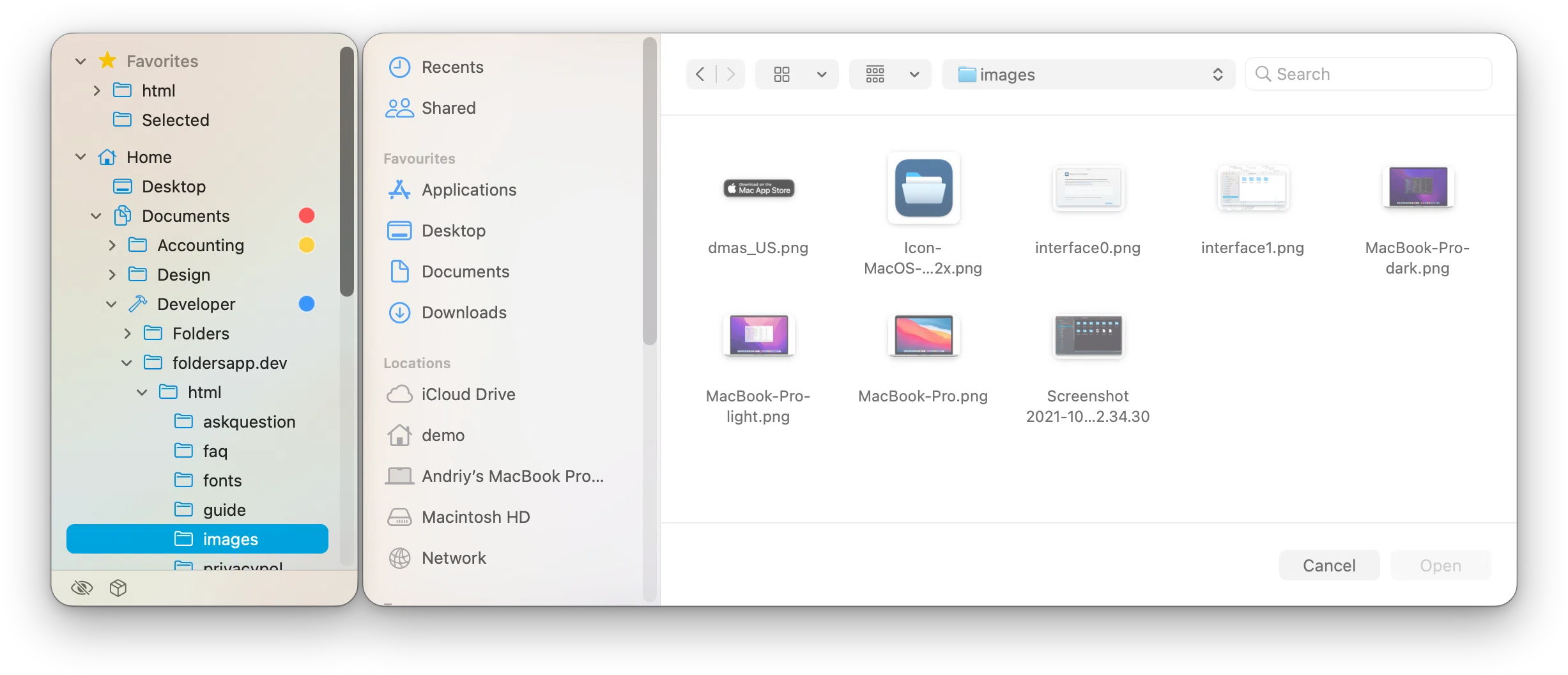
Every drive, cloud service, and favorite folder is one click away. No more drilling down column by column.
Navigate in the dialog, and the tree selection follows.
→ Favorites, expandable to their subfolders, and your Home folder
→ Internal and external drives, and network shares, WebDAV included
→ iCloud Drive and Cloud Storage: Dropbox, OneDrive, Google Drive, and more
→ Structural changes are reflected in the tree right away
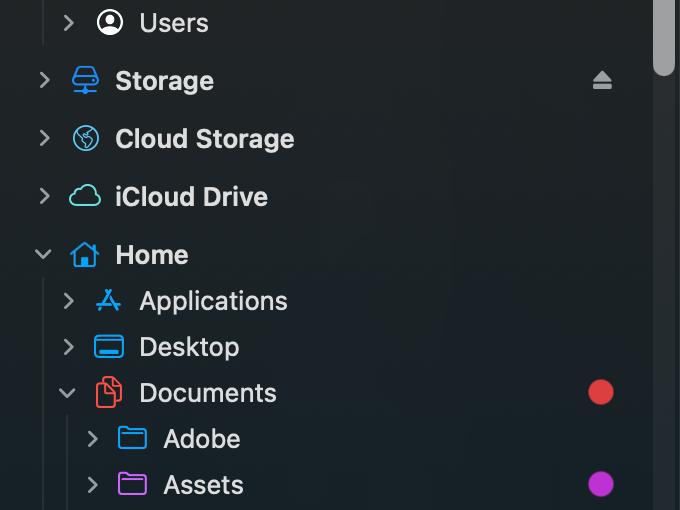
A tree with customized appearance
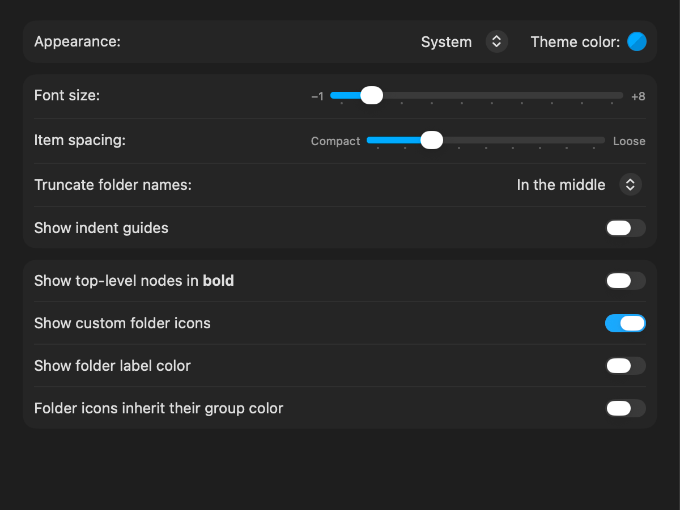
Appearance Settings
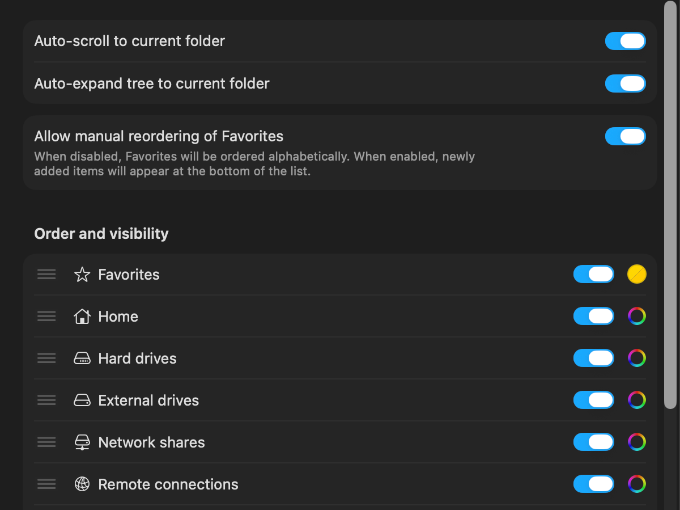
Folder Tree Settings
→ Theme and accent color, font size, row spacing, order, and visibility
→ Indent guides, label colors, custom folder icons
→ Settings synced across your Macs with iCloud
→ Open a folder in Finder or you preferred terminal app
→ Add folders to Favorites and remove them
→ Copy a folder or its path
→ Set color and text tags
→ Show or hide hidden folders, packages, and apps with the buttons below the tree
Supports localization for English, Arabic, Bulgarian, Catalan, Chinese (Simplified), Chinese (Traditional), Croatian, Czech, Danish, Dutch, Finnish, French, German, Greek, Hebrew, Hungarian, Indonesian, Italian, Japanese, Kazakh, Korean, Lithuanian, Norwegian (Bokmål), Polish, Portuguese (Brazil, Portugal), Romanian, Slovak, Slovene, Spanish, Swedish, Thai, Turkish, and Ukrainian.
One-time purchase with true lifetime updates, no ads or subscriptions
Try Folders Mini for free with a fully functional 14-day trial period
With every new release, get 3 additional days to evaluate the updates
→ In Folders Pro › Settings › Folders Mini, turn on “Show folder tree beside Open and Save dialogs”
→ Allow Device Control and Data Access (Accessibility in macOS 26 and earlier) for “Folders Mini Companion” when macOS asks
→ Optionally, turn on “Open Folders Mini Companion at login”; System Settings lists it under Login Items & Extensions as part of Folders Pro
→ The Companion works while Folders Pro is closed, but stays off while Folders Mini runs: quit Folders Mini and remove it from Open at Login to switch over
→ Install Folders Pro on the Mac with your licensed Folders Mini: its purchase window offers the upgrade price, which Folders Mini’s Settings › Folders Pro shows too
→ Folders Pro includes Folders Mini Companion, so you won’t need Folders Mini any more
Folders Mini runs fully functional for 14 days, and every new release adds 3 more days of evaluation. One license covers up to 5 Macs.
The Folders Mini license is sold in a secure checkout run by Paddle, our merchant of record. No account is needed, just your e-mail address. Where your country applies a single national rate of VAT or GST, that tax is included. Where the tax depends on your state or region — as with sales tax in the United States and Canada — it is added at checkout.
To find Open and Save dialogs and send them to the folder you click. macOS asks at first launch; you can also allow it later in System Settings › Privacy & Security › Device Control and Data Access (called Accessibility in macOS 26 and earlier). Folders Mini uses it only for file dialogs, and nothing about your files leaves your Mac.
With every app that uses the standard macOS Open and Save dialog, which is nearly all of them. Apps that draw their own file dialogs are out of its reach.
App Store apps must be sandboxed, and a sandboxed app can’t get the Device Control and Data Access permission. That’s also why Folders File Manager from the App Store doesn’t include it.
No. Folders Pro includes Folders Mini Companion (steps above). It works while Folders Pro is closed and shares its favorites, tree order, theme color, and font size.
Both put your favorite folders one click away in every Open and Save dialog. Default Folder X does it with menus added to the dialog, and adds much more on top: recent files and folders, keyboard shortcuts, previews and file info, file management, and Finder add-ons.
Folders Mini puts a complete, live folder tree beside the dialog — the same tree as in Folders. Favorites expand right in the tree, and a folder’s context menu opens it in Finder or your terminal app, copies its path, or sets its tags.
No. Folders Mini is a one-time purchase of US$ 6.99 for up to 5 Macs.
Yes. Folders Mini runs fully functional for 14 days with no card and no account, and every new release adds 3 more days of evaluation. Nothing is charged automatically when the trial ends.
Yes, for US$ 9.00 (steps above).
macOS 13.0+ · Free 14-day trial · One-time purchase, US$ 6.99 · No account required · Version History

Apple®, Apple logo®, Mac®, MacBook Pro®, Macintosh®, macOS®, App Store®, Finder®, GarageBand®, iCloud®, iCloud Drive®, iPhone®, Keynote®, Numbers®, Pages®, Spotlight®, Live Text®, QuickTime®, Swift®, and AppleScript® are trademarks of Apple Inc., registered in the U.S. and other countries and regions.
Copyright © 2023–2026 Andriy Konstantynov. All rights reserved.
🇺🇦 Made in Ukraine